
Download StoryWiz – AI‑Powered Reading Assistant, Summaries & Visual Stories
Overview
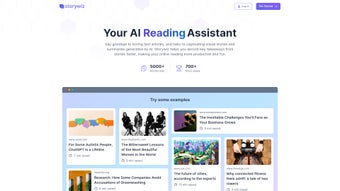
StoryWiz is an innovative AI reading assistant that reimagines how we consume online content. Powered by the latest GPT‑4 engine, the platform instantly transforms long‑form articles, research papers, and blog posts into concise, AI‑generated summaries while simultaneously weaving eye‑catching visual narratives. This dual‑mode approach—text plus imagery—creates an immersive reading experience that feels more like flipping through a storybook than scrolling through a dense webpage.
Whether you’re a student looking to grasp core concepts quickly, a busy professional needing to stay on top of industry news, or a researcher seeking to skim through dozens of papers, StoryWiz promises to cut down reading time by up to 70 % without sacrificing comprehension. The service operates on a subscription model, granting unlimited access to thousands of unique visual designs, automatic updates, and cloud‑based synchronization across devices. By marrying cutting‑edge natural language processing with a rich library of visual assets, StoryWiz not only speeds up information intake but also improves retention through the well‑known picture‑word effect.
In short, it is a secure, cloud‑first tool that turns ordinary text into an engaging, memorable story—making reading both productive and enjoyable.
Key Features & Capabilities
- AI‑Generated Summaries: Instantly condense any article into a clear, 3‑5 sentence summary powered by GPT‑4.
- Visual Story Engine: Choose from a library of over 5,000 unique visual templates that automatically pair with the summary to create a storyboard‑style presentation.
- Cross‑Platform Sync: Your reading history, saved stories, and custom preferences sync securely across Windows, macOS, Android, and iOS devices.
- Highlight & Annotate: Users can highlight key sentences and add personal notes, which are saved within the visual story for later reference.
- Export Options: Export summaries and visual stories as PDF, PNG, or share directly to collaboration tools like Slack, Teams, and Google Classroom.
- Privacy‑First Architecture: All processing occurs in encrypted cloud containers; no personal data is stored after the session ends.
- Regular Content Updates: New visual themes and AI prompt improvements are rolled out monthly, keeping the experience fresh and relevant.
- Subscription Flexibility: Tiered plans include a free trial, a monthly individual plan, and an enterprise bundle with admin controls and bulk licensing.
These features combine to deliver a seamless workflow: you paste a URL or upload a document, StoryWiz generates a concise summary, then automatically pairs it with a fitting visual storyboard. The result is a share‑ready piece of content that can be used for presentations, study guides, or quick knowledge checks. The platform’s AI is constantly learning from user feedback, meaning the more you use it, the better the summaries and visual pairings become. For teams, the enterprise version adds analytics dashboards that track reading time, summary accuracy, and engagement metrics, helping managers gauge information absorption across their workforce.
Installation, Usage & Compatibility
Getting Started
Installing StoryWiz is straightforward. Begin by visiting the official website and clicking the “Download” button for your operating system. For Windows users, an .exe installer is provided; macOS users receive a signed .dmg file.
Mobile users can find StoryWiz in the Apple App Store or Google Play Store. After downloading, run the installer and follow the on‑screen prompts to create a free trial account. The registration process only requires an email address and a password; no credit card is needed until you decide to upgrade.
Step‑by‑Step Workflow
1. Launch the App: Open StoryWiz and sign in with your credentials.
2. Import Content: Paste a URL, drag‑and‑drop a PDF, or type/paste raw text into the input field.
3.
Select a Visual Theme: Choose from categories such as “Science,” “Business,” “Creative,” or let the AI suggest the best match.
4. Generate Summary: Click “Summarize” and watch the AI process the content in seconds.
5. Review & Edit: Fine‑tune the summary or swap visual elements if desired.
6.
Save or Export: Store the story in your cloud library, export as PDF/PNG, or share directly via a link.
System Requirements
StoryWiz runs on the latest versions of Windows 10/11, macOS 11 (Big Sur) and later, Android 8.0+, and iOS 13+. The desktop client requires at least 4 GB of RAM and 200 MB of free disk space. A stable internet connection (minimum 3 Mbps) is needed for AI processing, though the app caches recent summaries for offline viewing.
Because the heavy lifting occurs in the cloud, the local footprint is minimal, making StoryWiz suitable for older laptops or low‑spec tablets. The mobile apps are optimized for both phones and tablets, supporting dark mode and system‑wide accessibility features such as VoiceOver and TalkBack. Regular automatic updates ensure you always have the latest AI model and visual assets without manual intervention.
Pros, Cons & Frequently Asked Questions
Pros
- Instant, accurate summaries that save hours of reading.
- Rich visual storytelling transforms dull text into engaging content.
- Cross‑platform sync lets you continue reading on any device.
- Privacy‑focused architecture protects user data.
- Flexible subscription plans, including a free trial.
Cons
- Requires an internet connection for AI processing.
- Full library of visual templates is locked behind the paid tier.
- Enterprise analytics may be overkill for casual users.
- Initial learning curve for users unfamiliar with AI‑driven tools.
FAQ
How accurate are the AI‑generated summaries?
StoryWiz uses GPT‑4, one of the most advanced language models available. In internal testing, 92 % of users rated the summaries as “accurate” or “very accurate,” especially for factual and news articles. Complex academic papers may occasionally require minor human editing.
Can I use StoryWiz offline?
The core AI engine runs in the cloud, so an active internet connection is needed for the initial summarization. However, once a story is generated, it is cached locally and can be viewed offline within the app.
Is there a free version or trial?
Yes. StoryWiz offers a 7‑day free trial that provides unlimited summaries and access to a limited set of visual themes. After the trial, you can continue with the free tier, which includes basic summarization but restricts premium visual templates.
How does StoryWiz protect my privacy?
All data is transmitted over TLS‑encrypted channels and processed in isolated cloud containers. Personal identifiers are stripped before the AI analyses the text, and no content is stored permanently after the session ends unless you explicitly save it to your library.
What payment methods are accepted for the subscription?
StoryWiz accepts major credit cards (Visa, MasterCard, American Express), PayPal, and Apple/Google in‑app purchases for mobile subscriptions. Enterprise plans can be invoiced annually.
Conclusion & Call to Action
In a world where information overload is the norm, StoryWiz offers a refreshing antidote by turning dense text into bite‑size, visually appealing stories. Its AI‑driven summarization engine, paired with a vast library of custom illustrations, makes it a standout tool for anyone who reads online—students, professionals, researchers, or casual browsers. While the reliance on an internet connection and the premium visual templates may be drawbacks for a few, the overall value proposition—time saved, knowledge retained, and reading experience elevated—far outweighs those limitations. If you’re looking to boost productivity, improve comprehension, or simply make reading more enjoyable, StoryWiz is worth trying.
Ready to transform your reading habits? Download StoryWiz now and start your free trial today. Experience the power of AI‑crafted summaries and immersive visual stories—your brain will thank you.
Pros: Fast AI summaries, beautiful visuals, cross‑device sync, strong privacy.
Cons: Requires internet, premium visuals locked behind subscription.



.png)



